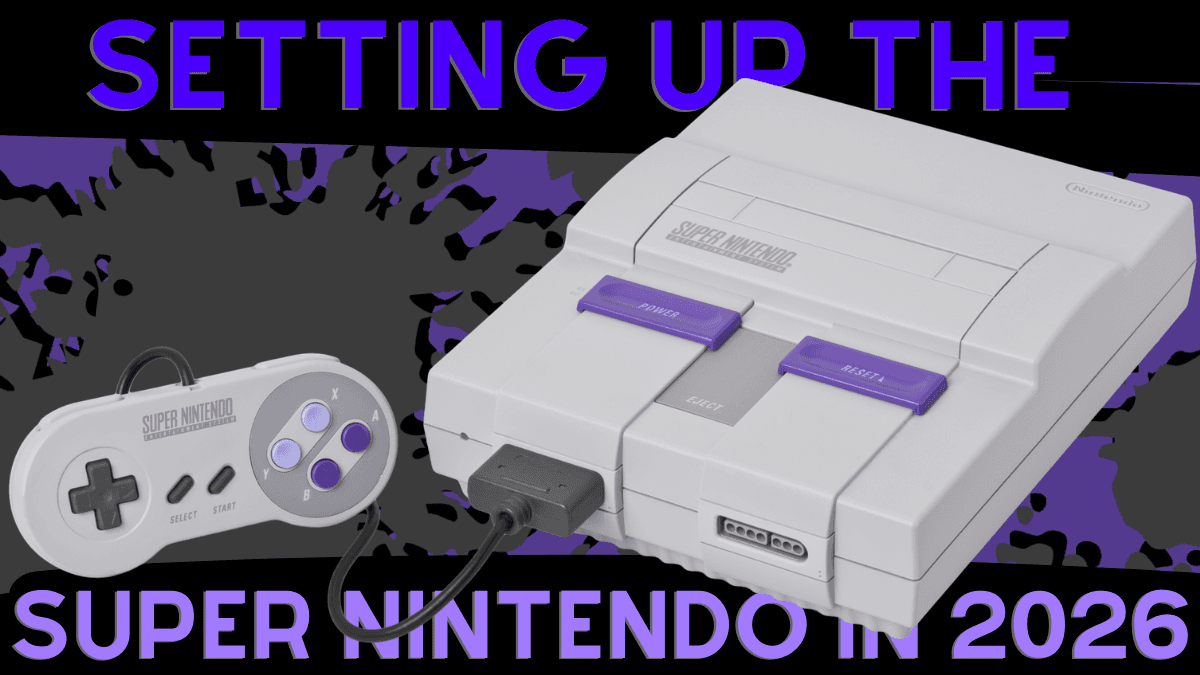
The Super Nintendo is over 30 years old. That is not a typo. The console that gave us some of the greatest games ever made is now firmly in “retro” territory, and setting one up in 2026 is a very different experience than pulling one out of a box on Christmas morning in 1992.
The good news is that the retro gaming community has spent decades perfecting the art of getting the best possible experience out of original hardware. The bad news is that the sheer number of options can feel overwhelming if you are starting from scratch.
This guide walks through everything you need to get your SNES running in 2026, from power to picture to controllers to games. We will keep it practical, explain why each piece matters, and point you toward the products we trust and carry at CastleMania Games.
Start With the Console
Before anything else, you need a working SNES. Whether you have one in a closet, inherited one from a friend, or found one at a garage sale, give it a visual inspection. Look for corrosion around the cartridge slot, check that the power port is not damaged, and make sure the AV port on the back is clean. A cotton swab with isopropyl alcohol goes a long way.
If you are buying one, the original SNS-001 (the big “bread loaf” model) is the better choice for video quality. The later SNS-101 (the SNES Jr. or “mini”) is smaller and cheaper, but it cannot output S-Video or RGB without modification, which limits your display options down the road.
Power Supply: Replace the Original
This is where most people go wrong. They dig out the original Nintendo power adapter, plug it in, and hope for the best. Here is the problem: that power supply is just as old as the console. Aging capacitors, degraded cables, and inconsistent voltage are real concerns. An unreliable power supply can cause graphical glitches, audio issues, and in worst cases, damage to the console itself.
Unless you have the electrical knowledge and soldering skills to recap and test an original adapter, the smart move is to replace it.
We carry the Rondo Products SNES-Con Kit, which pairs a Triad Magnetics WSU090-1300 power supply with a Rondo Products SNES-CON adapter. The Triad is a regulated, modern power supply that delivers clean, consistent 9V power. The adapter converts the Triad’s standard barrel connector to the SNES proprietary plug. It works with both the original SNS-001 and the SNS-101 “mini.”
This is not just our opinion. FirebrandX, one of the most respected voices in retro gaming display calibration, maintains a comprehensive guide recommending Triad power supplies for virtually every retro console. HD Retrovision, the company behind the gold standard in component video cables, also endorses the Triad as their recommended third party power supply. When the cable and calibration experts agree, it is worth listening.
One important note: pay attention to polarity. The SNES requires center-negative polarity. The wrong adapter with incorrect voltage polarity can damage your console. The Rondo Products kit handles this for you, which is one more reason to use a purpose-built solution rather than hunting for a generic adapter on Amazon.
Video Cables: Understanding Your Options
With the console powered up, you need to get a picture to your TV. This is where things get interesting because the SNES is capable of much better video output than most people ever saw in the 1990s. The cable you choose determines not just how good the picture looks, but what displays you can connect to and how your setup can grow over time.
Here is a breakdown of every option, from cheapest to best.
Composite Video (The Yellow Cable)
This is what came in the box. One yellow plug for video, two red and white plugs for audio. Every TV with RCA inputs accepts composite, and it works. But “works” is doing a lot of heavy lifting. Composite video smashes all of the color and brightness information into a single signal, which causes visible dot crawl, color bleeding, and a generally soft image.
If you just want to play and you already own a composite cable, it is perfectly fine for getting started. But if you are spending money on a setup in 2026, you can do much better for not much more.
S-Video (The Significant Upgrade)
S-Video separates the brightness (luma) and color (chroma) information into two distinct signals. The result is a noticeably sharper image with reduced color bleeding and almost no dot crawl. If you have ever seen the SNES running on S-Video after years of composite, the difference is striking.
We carry two S-Video options:
The KMD S-Video AV Cable is a budget-friendly option that uses the standard Nintendo multi-out connector and works with the SNES, N64, and Gamecube.
The Insurrection Industries Nintendo S-Video Cable is our recommendation if you want to do S-Video right. Insurrection builds their cables with double-shielded, proprietary cable and pure copper wiring. The difference shows up as a cleaner signal with less interference, especially on longer runs or in setups with multiple electronics nearby.
Our take: If you are on a budget and your TV has an S-Video input, the Insurrection S-Video cable is the single best dollar-to-visual-improvement upgrade you can make. The jump from composite to S-Video is dramatic. It is the sweet spot where you spend a little and gain a lot.
Component Video (YPbPr)
Component video goes a step further than S-Video by splitting the signal into three channels: one for brightness and two for color difference. This produces the cleanest analog image the SNES can output without modification, with accurate colors, sharp edges, and none of the artifacts that plague composite or even S-Video.
The HD Retrovision SNES YPbPr Component Cable is the definitive component cable for the Super Nintendo. HD Retrovision started as a Kickstarter project by two engineers who wanted to solve a simple problem: getting the best analog picture out of retro consoles without any modifications to the hardware. Their cables tap the SNES multi-out for RGB and convert it to component on the cable itself, delivering a signal that rivals dedicated RGB setups.
Important compatibility note: The HD Retrovision SNES component cable does not work with the stock SNES mini (SNS-101) or the Super Famicom mini (SHVC-101). Those consoles lack the necessary video output pins. It works beautifully with the original SNS-001 model. Your TV must also support 240p over component, which most CRTs and many newer displays do, but it is worth testing.
RGB SCART
SCART is the European standard for analog video, and it carries a full RGB signal, meaning red, green, and blue each get their own dedicated channel along with sync. In terms of raw signal quality, RGB SCART and component video are extremely close. The difference comes down to your setup and what equipment you are routing the signal through.
The Insurrection Industries SNES RGB SCART Cable (C-Sync) is built to the same high standard as their S-Video cables, with proper shielding and clean sync. It is for NTSC consoles only.
SCART vs. Component: which should you choose? In North America, component is the more practical choice. Component inputs are standard on CRTs, many modern TVs, and most upscalers. You can plug an HD Retrovision cable into just about any component-compatible display and it works. SCART, on the other hand, requires either a SCART-compatible display (rare in North America), a SCART switch feeding into an upscaler, or a direct SCART-to-upscaler connection. The ecosystem is more involved.
Where SCART wins is flexibility across consoles. If you are building a multi-console setup with systems that do not have good component cable options (3DO, Jaguar, Neo Geo, some European consoles), SCART might be the better long-term investment because one switch can handle everything.
For a pure SNES setup in North America, we think component via HD Retrovision is the optimal route. The cable quality is excellent, the connectors are robust, and compatibility is about as close to plug-and-play as analog video gets.
HDMI Adapters (The Budget Shortcut)
If you own a modern TV with only HDMI inputs and want the simplest possible path to playing, the Hyperkin 3-In-1 HDTV Cable Pro Edition converts the SNES signal to 720p HDMI. It works with the SNES, N64, and Gamecube, and includes four visual modes so you can dial in the look you prefer.
Here is the honest trade-off: these adapters introduce input lag. For RPGs like Chrono Trigger or Final Fantasy VI, where timing is not critical, this is a perfectly fine solution that gets you playing for relatively little money. For competitive fighters like Street Fighter II Turbo or Mortal Kombat, or precision platformers like Mega Man X and Super Metroid, that lag will cost you. If timing matters in the games you play, invest in a proper analog cable and, when the budget allows, a dedicated upscaler.
Our Cable Recommendation Summary
Just get playing (budget): Use whatever composite cable you have, or grab the Hyperkin HDTV cable if your TV only has HDMI.
Best value upgrade: The Insurrection Industries S-Video cable. The visual jump from composite to S-Video is massive relative to the cost.
The optimal setup for North America: HD Retrovision SNES Component Cable. Consistent quality, excellent connectors, and the widest compatibility with North American displays and upscalers.
Building a multi-console SCART setup: Insurrection Industries SNES RGB SCART Cable, paired with a SCART switch and upscaler.
Switches and Upscalers: The Display Chain
Once you have quality cables, you may want to route multiple consoles through one display or upscale the analog signal for a modern 4K TV. This is where switching and scaling hardware comes in.
The gcomp Switch
The gcomp Automatic 8:2 Component/Composite Switch is an automatic 8-input, 2-output switch for component and composite video. Plug in up to eight consoles, and the switch automatically detects which one is powered on and routes it to your display. No remote, no button pressing. Just turn on the console and play.
The gSCART Switch
The gSCART Automatic 8:2 SCART Switch does the same thing for SCART setups. Eight inputs, two outputs, automatic switching, with sync regeneration and Sync on Green support built in. If you are committed to a SCART-based setup, this is the switch to build around.
The Morph 4K
The Morph 4K by PixelFX is a modular 4K video upscaler that takes low-resolution video and scales it beautifully to 4K at 60Hz with full 4:4:4 color. The base unit handles HDMI input, and expansion cards add analog inputs like SCART and component. It features WiFi updates, Bluetooth control, scanline simulation, CRT shader effects, and per-game profile support.
For anyone building a serious retro gaming setup on a modern display, an upscaler like the Morph 4K is the piece that ties everything together. It takes the clean signal from your HD Retrovision or Insurrection cables and presents it on a 4K TV the way it was meant to look, with sharp pixels, proper aspect ratio, and optional CRT effects that recreate the look of the original displays.
Controllers: Holding the Line
With power and video sorted, you need something to hold. Controller choice is more personal than anything else on this list, but here is how we think about it.
First Party (The Gold Standard)
Nothing beats a properly maintained original SNES controller. The d-pad is still one of the best ever made, the buttons have a distinct and satisfying feel, and there is a tactile quality to first-party Nintendo hardware that third parties rarely match. If you have original controllers, clean them, check the cable for damage, and keep using them.
The challenge is that original controllers are getting harder to find in good condition, and worn-out contact pads and stiff buttons are common in controllers that have seen decades of use.
Hyperkin Scout (Wired)
The Hyperkin Scout Premium Controller is our go-to recommendation for a new wired controller. It replicates the original SNES layout with a 10-foot cable, good build quality, and a price that makes it easy to pick up a couple for two-player sessions.
Hyperkin Scout (Wireless)
The Hyperkin Scout Premium BT Controller adds Bluetooth wireless with an included dongle. You get up to 30 feet of range, a rechargeable lithium-ion battery, and the same layout as the wired version. It is also compatible with PC, Mac, and Android.
Retro-Bit Legacy16 Wireless
The Retro-Bit Legacy16 2.4GHz Wireless Controller takes a different approach with 2.4GHz wireless (lower latency than Bluetooth for gaming), analog sticks, and additional shoulder buttons. It includes both SNES and USB receivers, so you can use it on original hardware and modern devices. It is a solid value pick, especially for players who want wireless without breaking the bank.
The Games: Where to Start
You have the hardware. Now you need the software. The SNES library is deep, but if you are building a collection from scratch or just want to know what to play first, these are the essentials.
The Legend of Zelda: A Link to the Past is the template that defined action-adventure games for a generation. The overworld-to-dungeon structure, the item progression, the sense of discovery. It is as close to a perfect game as the SNES produced.
Super Metroid is atmospheric, challenging, and rewarding in a way that few games have matched since. The feeling of exploring Zebes and slowly gaining the abilities to reach new areas is still unmatched. It also happens to be one of those games where controller lag will absolutely ruin your day, so invest in a good cable setup.
Super Mario World shipped with the console and remains one of the best platformers ever made. The level design is endlessly creative, the controls are precise, and the secret exits give it serious replay value.
Chrono Trigger is a turn-based RPG with a time-travel storyline that still holds up. The combat system eliminated random encounters in favor of on-screen enemies, the multiple endings incentivize replays, and the Akira Toriyama character designs are iconic. This is the perfect game for a Hyperkin HDTV cable setup if you are going the budget HDMI route.
Final Fantasy VI (released as Final Fantasy III in the US) has one of the most ambitious narratives the SNES ever saw. A massive cast of characters, a villain who actually succeeds, and a second half that opens up into a completely non-linear structure. The opera scene still gets people.
Donkey Kong Country was a technical showcase in 1994 and it remains a great platformer today. The pre-rendered 3D graphics were groundbreaking at the time and have aged into their own distinct aesthetic.
Secret of Mana is an action RPG designed for up to three players simultaneously. If you picked up extra controllers, this is the game that justifies it. The combat is real-time, the world is colorful, and the multiplayer transforms the experience.
Contra III: The Alien Wars is pure run-and-gun action. Fast, loud, and brutally difficult. This is another game where lag will get you killed, so plan your cable setup accordingly.
Final Fantasy IV (released as Final Fantasy II in the US) pioneered the Active Time Battle system and delivered a story with real emotional weight. It is a great entry point if you have never played a classic JRPG.
Putting It All Together
Here is what a complete SNES setup looks like in 2026, from budget to optimal:
Budget setup: SNES console, Rondo Products SNES-Con Kit for power, Hyperkin HDTV Cable Pro for HDMI output, Hyperkin Scout wired controller, and a stack of RPGs. Total investment beyond the console and games is modest, and you are playing tonight.
Mid-range setup: SNES console, Rondo Products SNES-Con Kit, Insurrection Industries S-Video cable, Hyperkin Scout wireless controller, and a CRT or S-Video-compatible display. This is where the picture starts to really sing.
Optimal setup: SNES console, Rondo Products SNES-Con Kit, HD Retrovision SNES Component Cable, gcomp switch (if running multiple consoles), Morph 4K upscaler, original SNES controllers for gameplay with a Scout wireless as backup. This is the setup that makes 30-year-old games look the way your memory says they looked.
Wherever you land on that spectrum, the most important thing is that you are playing. The SNES library is one of the greatest in gaming history, and original hardware is still the best way to experience it. Start with what you can afford, upgrade as it makes sense, and enjoy the games.
All products mentioned are available at CastleMania Games. Availability and pricing may vary.